



6PK Ink Cartridges PGI-280XXL CLI-281XXL for Canon Pixma TR8520 TR8620 TS8320
$ 9.88
Description
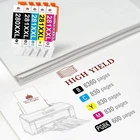
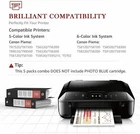
Model number: PGI-280 XXL CLI-281 XXL Page Yield: PGBK (Large Black) is 600 pages per cartridge, Small Black is 6360 pages per cartridge, Color is 830 pages per cartridge WHAT IS INSIDE? 1 x Large Black,1 x Small Black , 1 x Cyan,1 x Yellow,1 x Magenta,1 x Photo Blue The Box Is for Reference Only Compatible for Printer: Pixma TR7500, TR7520, TR8500, TR8520 Pixma TS6120, TS6220, TS6320, TS702, TS8120, TS8220, TS8320, TS9100, TS9120, TS9520, TS9521C Professional Performance: Toner Kingdom exclusive patented ink formula ensu res superb prints. Whether you need to print images in vivid color or pages with clear and crisp text, you can count on Toner Kingdom cartridges to provide you with superior results. Instruction Steps : Step 1: Make sure that the power is turned on, then open the scanning unit / cover. The print head holder will moves to the replacement position. Remove the ink tank where the ink runs out. Push the tab (A) and lift the ink tank to remove. Step 2: A. Prepare a new ink tank. Hold the ink tank with the orange protective cap pointing up. B. Lift up the tab on the orange protective cap to remove it off Gently. Step 3: Close the scanning unit / cover. Just be careful not to get your fingers caught.