
5PACK Ink Cartridges for Canon PGI-280 XXL CLI-281 XXL PIXMA TS8120 TR8520
$ 6.83
Description
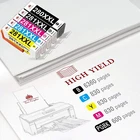
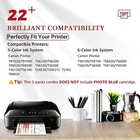
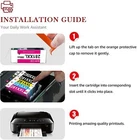
Product Information 5 PACK Ink Cartridge for Canon PGI-280 XXL CLI-281XXL 1. Product: Ink Cartridge 2. Item condition: Brand New with Chip 3. Compatible Brand: For Canon 4. Package Include : 1x Large Black /1x Black / 1x Cyan / 1x Magenta / 1x Yellow 5. Page Yield: Up to 600+ Pages per PGI-280 XXL Large Black ; Up to 830+ Pages per CLI-281 XXL Cyan , Magenta , Yellow ; Up to 6360+ Pages per CLI-281 XXL Black . 6. High capacity and excellent performance. Excellent print quality for lively, color-fast texts and graphics Instruction Steps Instruction Steps: Step 1: Make sure that the power is turned on, then open the scanning unit / cover. The print head holder will moves to the replacement position. Remove the ink tank where the ink runs out. Push the tab (A) and lift the ink tank to remove. Step 2: A. Prepare a new ink tank. Hold the ink tank with the orange protective cap pointing up. B. Lift up the tab on the orange protective cap to remove it off Gently. Step 3: Close the scanning unit / cover. Just be careful not to get your fingers caught. Compatible Model If your printer "Non-Original Ink Cartridges" are displayed, please press Next or OK to continue. Pixma TS6120 Pixma TS8120 Pixma TS6220 Pixma TS8220 Pixma TS6300 Pixma TS8320 Pixma TS6320 Pixma TS8322 Pixma TR7500 Pixma TS9100 Pixma TR7520 Pixma TS9120 Pixma TR8500 Pixma TS9520 Pixma TR8520 Pixma TS9521C Pixma TR8620 Pixma TS702 Note 1. Please make the cartridge upside down, wait for 2 minutes, remove the orange protective clips carefully, and install the cartridge into printer. 2.The computer would appear Non-Genuine, please click Yes continuously, then the printer can go on to print. 3. If cartridge not recognized by printer, remove the cartridge carefully, gently wipe the contact points on the printer with a moist, lint free, soft cloth. Then re-install. 4. If line or blurry happens, Pls run a print cartridge cleaning and re-alignment function.